Copssh Server 8 FAQs
Frequently Asked Questions
Copssh Server 8
- 🔗 Copssh stops to work after a Windows update
The problem can be related to address changes of Windows DLLs after a Windows update operation. That behaviour may create collisions for more static Cygwin DLLs, especially in a 32-bit environment. We suggest to reboot the system as a first measure. You may need to install Copssh again by using our recipe which allows to keep an existing configuration intact. Consider to install the 64-bit version (available only in the product edition) if the problem still persists.
- 🔗 How can I activate users/groups and set up public keys?
Activating users/groups can be done in multiple ways:
- Using
AllowUsers/AllowGroupsdirectives globally - requires that user does have a Windows profile directory
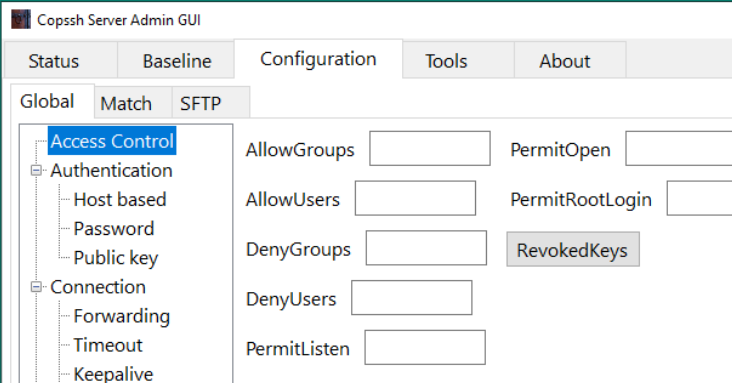
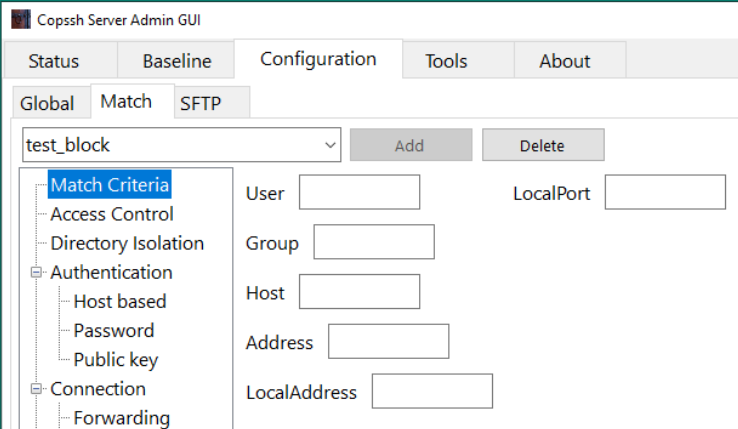
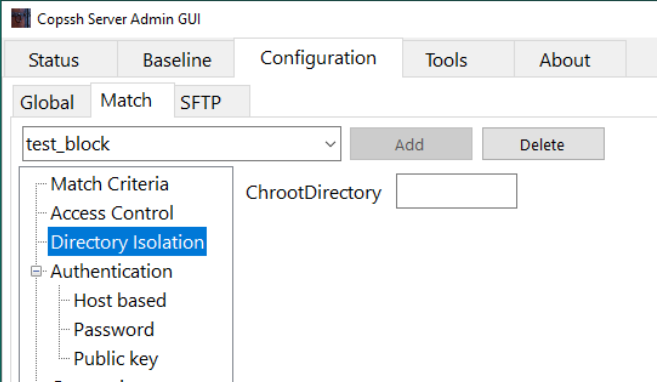
- Create a match block for a specific user/group (you can use directory isolation to specify a specific directory instead of user profile directory)
Copying public key can be done via Tools → Copy public key. It uses the tool
ssh-copy-id. You can uselocalhostto contact the copssh server.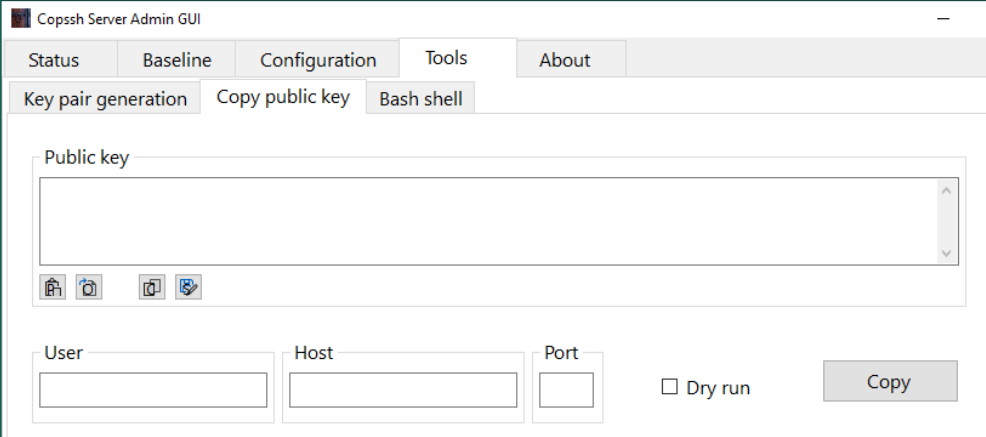
- Using
- 🔗 How can I make a clean install without losing the existing setup?
In some situations, it may be necessary to make a clean install to make an upgrade work. You can do it by following steps below:
- Backup your host keys in etc directory (
etc/ssh_host*) - Uninstall the existing version of Copssh
- Remove remnants of the installation directory except home directories if they exist
- Make sure that the service account and the sshd account are removed if they exist
- Install new Copssh
- Restore host keys back to etc directory
- Start Copssh Control Panel and verify that the service is running
- Activate your users again and specify their existing home directories as the home directory during the activation
- Backup your host keys in etc directory (
- 🔗 How can I rotate Copssh log file?
Copssh 8 syslog daemon writes log messages to
/var/log/messagesas default. You may need to introduce a log rotation scheme to keep growth of that file under control.You can use the recipe below to use our free tool logwot8 for that purpose.
- Install logwot8 to a separate directory
- Edit the configuration file
logwot8.confaccording to your requirements. The example below will rotate the log file weekly by keeping last 12 weeks of log activity in compressed files. See documentation for more options.
# Remember cygwin path conventions: 'c:\work' becomes '/cygdrive/c/work' compress create "/cygdrive/c/copssh_x64/var/log/messages { rotate 12 weekly }- Create a Windows scheduled task running the batch file
logwot8.cmdweekly.
- 🔗 How can I run OpenSSH daemon in debug mode?
Sometimes it may be necessary to see directly how the openssh daemon reacts to startup or connection requests, to be able to locate daemon-related problems.
- Stop OpenSSH SSHD (system name: OpenSSHServer) service
- Right click Start a Unix Bash Shell from Copssh start menu (assuming that you have admin privileges)
- Enter the following command from the bash prompt:
/bin/sshd -p <listening port> -D -d -e
This will start openssh daemon in standalone debug mode and messages will be displayed on the screen. You may specify up to three
-dfor increased output verbosity.- Try to initiate a putty session and watch messages at the server side.
- 🔗 How do I access files/drives/resources outside the Copssh root directory?
- Start a bash shell, locally or remotely
- Change to the user's home directory if it is not already done
- Link a directory or network share to a local name by using
lncommand
Examples:
ln -s "/cygdrive/d/pub/" "pub"creates a link from
D:\pubtopubin the user's home directory.ln -s "//myserver/netdata" "netdata"creates a link from
\\myserver\netdatatonetdatain the user's home directory.Now, the user can use
pubandnetdatato accessD:\puband/or\\myserver\netdatarespectively. - 🔗 How do I improve the security of Copssh?
Some recommendations (not all of them can be applicable in your case, no sorting by importance):
Recommendation Benefits/Side effects How Change port 22 to something non-standard Reduces your vulnerability surface dramatically by taking a well-known parameter out of equation, not applicable if you have a general purpose server. Security by obscurity? Yes. However, there are many script kiddies out there bombing port 22 wherever they find. Conf.file etc\sshd_config:portReduce the maximum number of concurrent unauthenticated connections Reduces your vulnerability surface by allowing a smaller number of potentially dangerous attacks simultaneously. Conf.file etc\sshd_config:MaxStartups(default 10)Turn off authentication by password. Use public key authentication instead. Eliminates the most widely used technique of potential attacks: cracking passwords. Conf.file etc\sshd_config:PasswordAuthentication noPubkeyAuthentication yes(default yes)Restrict access by host Use your firewall setting to limit hosts authorized for access Restrict access by user/group Conf.file etc\sshd_config:AllowUsers,AllowGroups - 🔗 Local Windows accounts show up with a MACHINE+ prefix in usernames — can this be removed?
On domain-joined machines, Cygwin normally qualifies local SAM accounts with the machine’s NetBIOS name as a prefix (e.g.
MYSERVER+johninstead ofjohn). This is done to avoid name collisions with same-named domain accounts. Some environments find this prefix inconvenient — for example when SSH keys,authorized_keysfiles, or scripts reference plain usernames.Yes. A patched build of
cygwin1.dllis available upon request. We maintain a custom build ofcygwin1.dllwith a patch that removes theMACHINE+prefix for local SAM accounts on domain member machines, making them behave the same way as primary domain accounts. The plain username (e.g.john) is used directly.The patch itself is publicly available at https://gist.github.com/tevkar/dab3fb32346f6899e11e374f254746e9 for review or independent builds.
To obtain the patched DLL, please open a support request.
Before requesting, please be aware of the following:
- Name collisions are not detected or warned about. If a local account and a domain account share the same username, the first one resolved by the system wins. This can cause unexpected behaviour with permissions and home directory mappings.
- This is only relevant on domain-joined machines. On standalone machines the behaviour is unchanged.
- Existing setups may need updating. Any
authorized_keysfiles, scripts, or configurations that reference the prefixed form (e.g.MYSERVER+john) must be updated to use the plain username. - This is an unsupported customisation relative to the standard Cygwin distribution. The change will need to be reapplied when
cygwin1.dllis updated.
- 🔗 Why is it called Copssh?
I am fond of fancy and short names :-)
Cygwin + OPENSSH is a qualified guess !!